Figured it was time for a catch-up.
We've got a lot going on. Over the last six weeks I've been sat inside clients' businesses, I've built a Chrome extension on the side, Suzie's been deep in WhatsApp compliance, Tim's been rebuilding how we get estimates in front of customers, Paul's been unpicking the Business Central (Garage Hive) APIs, and Darren and I have been building the organisation structure and HR feature, the foundation of how our clients' businesses run. Lots of hares running, and every one of them heading the right way.
The trouble with lots of hares is that nobody sees the whole field. Each of us is looking at our own piece, and from where you're sat it can be hard to see how it joins up with everyone else's. So I wanted to write down where my head's at, what I've seen with clients, and how I think all of this pulls together into one thing for them. I've had a quick catch-up with Paul and Tim this morning, but feel it makes sense to get it in writing so we've all got something to come back to.
What I've seenWhat have I been up to for the last 6 weeks?
I've been filling my normal role, but I've also been sat at New Duston Garage every Thursday looking at how they actually work.
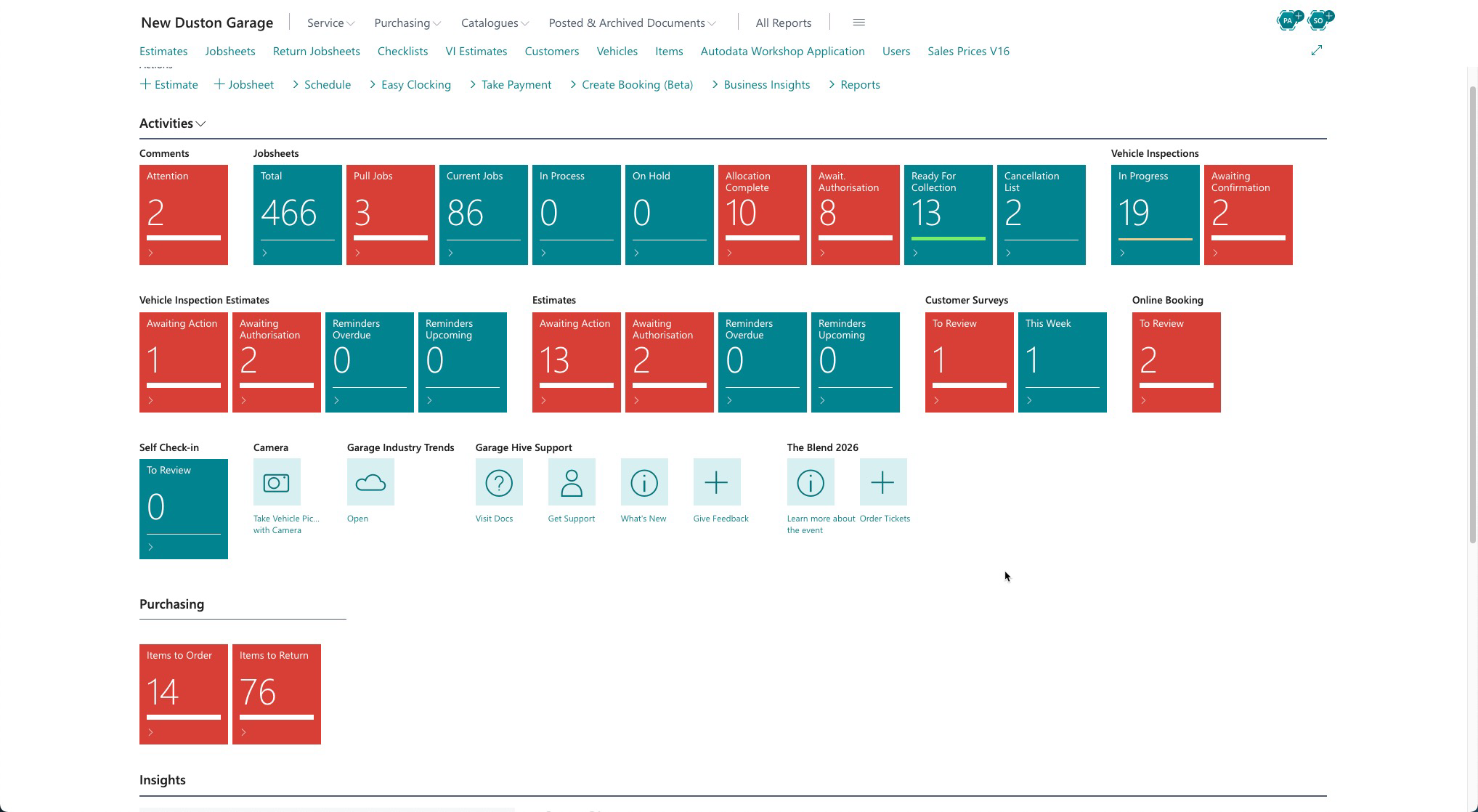
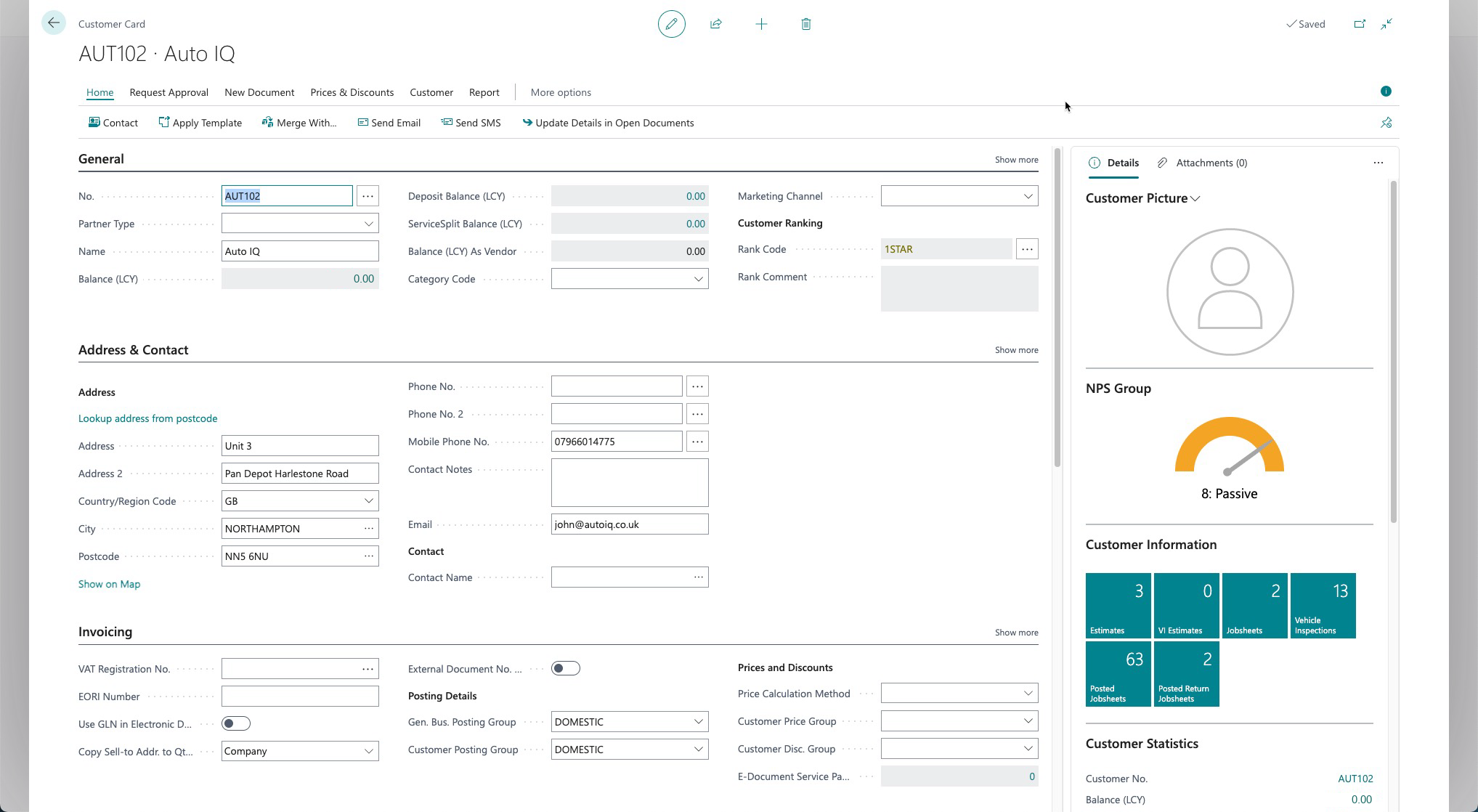
I've now got my own user on their Business Central (Garage Hive), so I've been able to see what the front of house team go through every day. It's an eye opener. Business Central can do a lot, but it's horrible to use, and I hadn't realised how bad until I sat next to someone using it. It's not just them, either. HubSpot, Infusionsoft, all of these systems get the same complaints for the same reason. Their workflow never fits the workflow of the business, so the business bends to the software, and people swap from one CRM system to the next, hoping the next one's better.
At the same time I've been living with the lead tracker problem. Suzie's team were sending garages leads and the garages weren't chasing them, so I built a Pathfinder board because Business Central wouldn't track their leads. It was painful to use. Every bit of data entry was manual. Clients in real pain, like Fitch, used it because they had to, and it did fix the problem. Once they could see the leads in front of them, they started chasing them, and they stopped asking for more work. But they weren't happy. Nobody likes typing everything in by hand.
So I built a Chrome extension, because I wanted to get a solution in front of them without adding to the weight on the dev team. It's a short term solution, but it does a job. It's built around one very specific task. Drop the quote PDF into Message Centre, it finds the customer and the car, you send the email and the text, you log the call, and it tells you who to ring next and when. The board fills itself in.
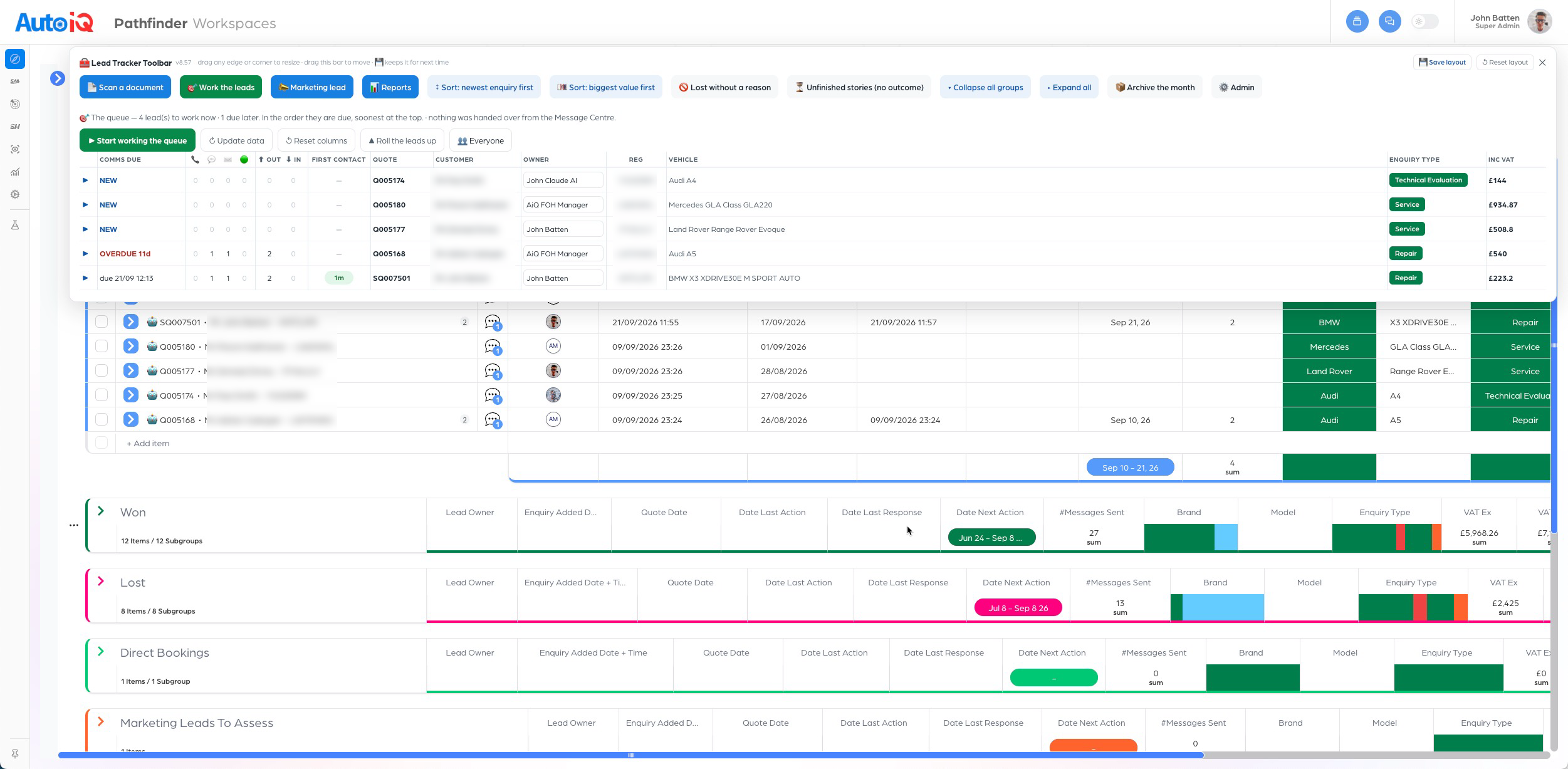
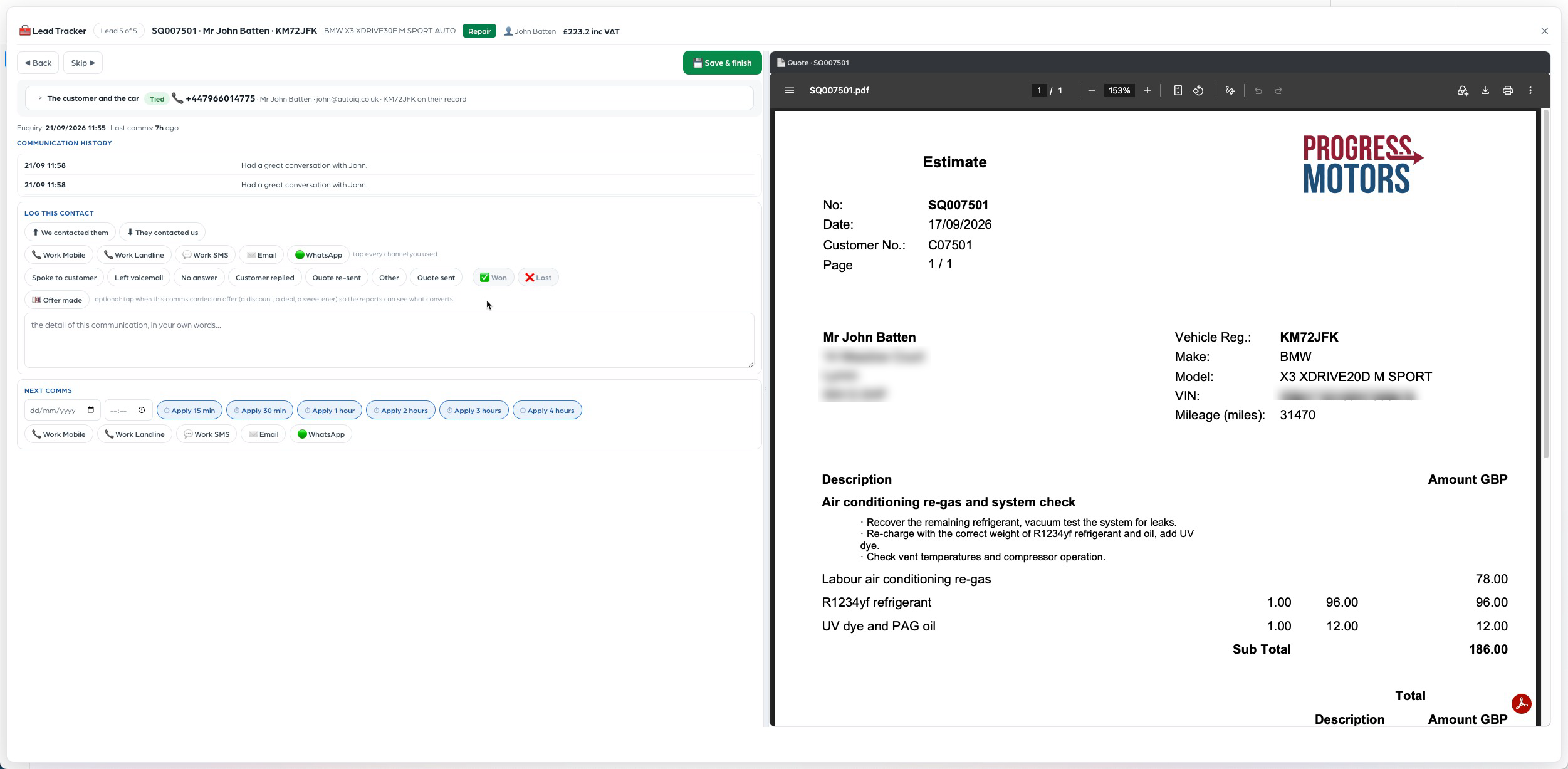
They love it. The front of house manager can see the team's leads for the day laid out in front of them, and knows exactly who needs calling and when. Nobody needed teaching, because they can't get it wrong.
Stepping backI've been reflecting on what's required
It doesn't matter how great I think our software is. If it isn't easy to use with the process built in, people will be reluctant to use it.
Sounds obvious when you put it in big black text.
It is good to take a step back and reflect every now and again. Not because you learn something new, but because the things you already know get brought to the fore, and you see what they mean for what you build next.
We've got lots of great software, and it's built well. Personally, I love Pathfinder. It's an amazing tool and I can bend it to do almost any job. The email template builder is the same, infinitely configurable. I wouldn't be without either of them.
But only a small number of our clients use them the way I would, and it isn't because they can't. It's because they're short on time. The capability is all there. What I haven't wrapped round it yet is the workflow, and that's a brief for me to write, not a gap in anyone's build.
I write the SOPs our clients run their businesses on, so our software should walk them through those SOPs one step at a time, showing only what they need at that moment.
So my thinking comes back to this. It's not "have we got good software?" It's "have we got good software they can use without thinking?"
A few things I keep coming back to, so you know what's in my head when I'm designing screens:
Workflow first
Messaging, quotes, boards: they all sit inside a specific workflow, reached from the sidebar.
Built for the person on the desk
Most front of house staff want a clear process, not more data. Paul raised this and he's right. We design for the middle, not the data lovers.
Low cognitive load
Only what's needed right now, on one 27 inch screen. Mobile first thinking, applied to a CRM.
Specialist, not generic
Every other garage system is generic because the people building it are going for the mass market. We're building software for marque specialists. We can ignore what everybody else does, because ours only needs to deliver the Auto iQ SOPs, and that's exactly why we can add serious money to a client's bottom line.
The opportunityWhere this is pointing
We've always built the software that garage management systems don't deliver. They're inherently bad at communications, so we've got Message Centre with SalesHawk, SaleMail and our template builders. They don't do planning, which is why we've got Pathfinder.
But having seen what I've seen over the last few weeks, I can't help thinking about the workflows that garage team members carry out every day, the ones that fill their eight hours. They all run through their garage management system, and all of these management systems are hideous and difficult to use. It's challenging using our SOPs in somebody else's garage management system.
I always knew we'd build a garage management system to go along with our garage operating system in the long term, with long term meaning 18 months or so. What I can't get away from is that while we're not building that yet, there's an opportunity open to us right now: improve the system they're already using, and build front ends that make Business Central headless.
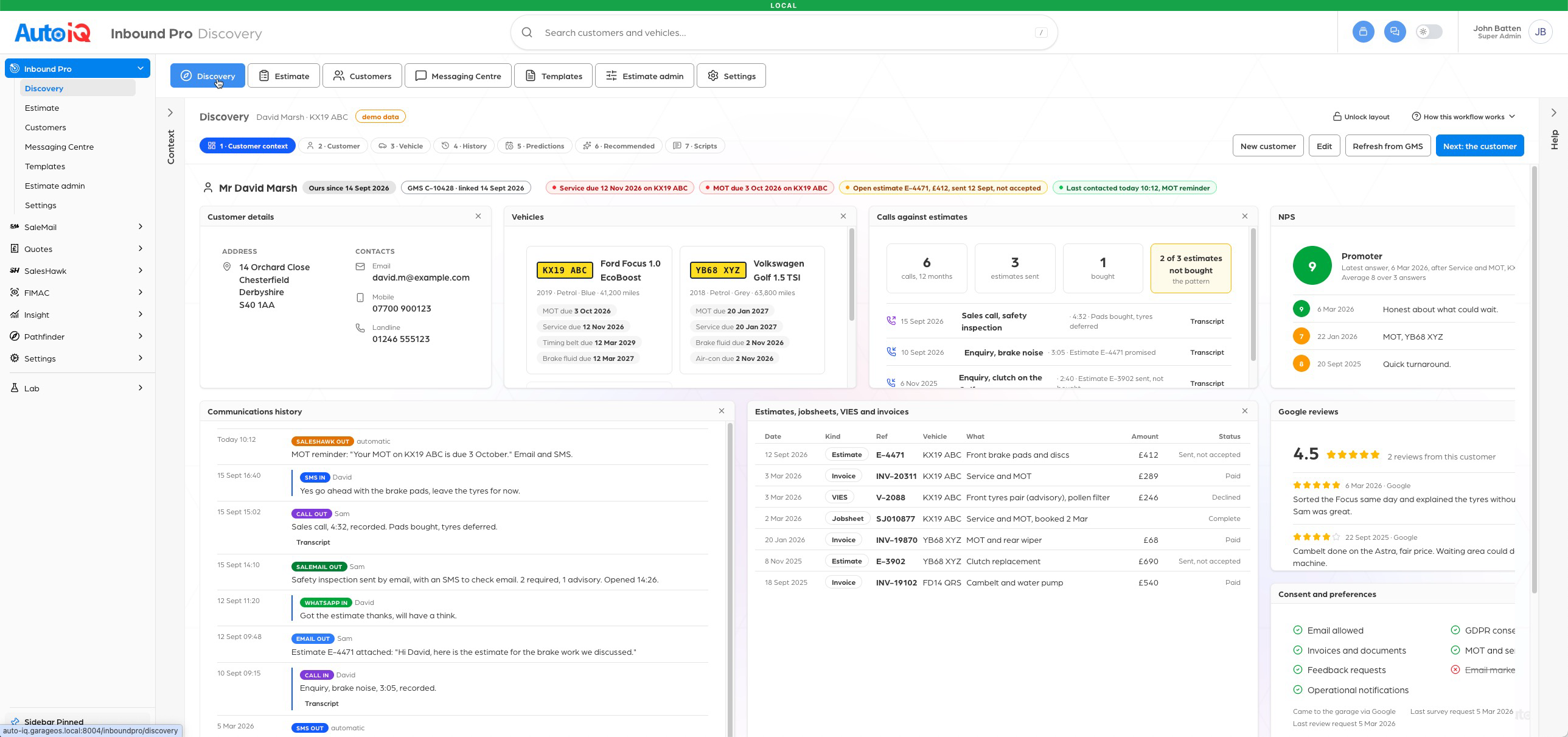
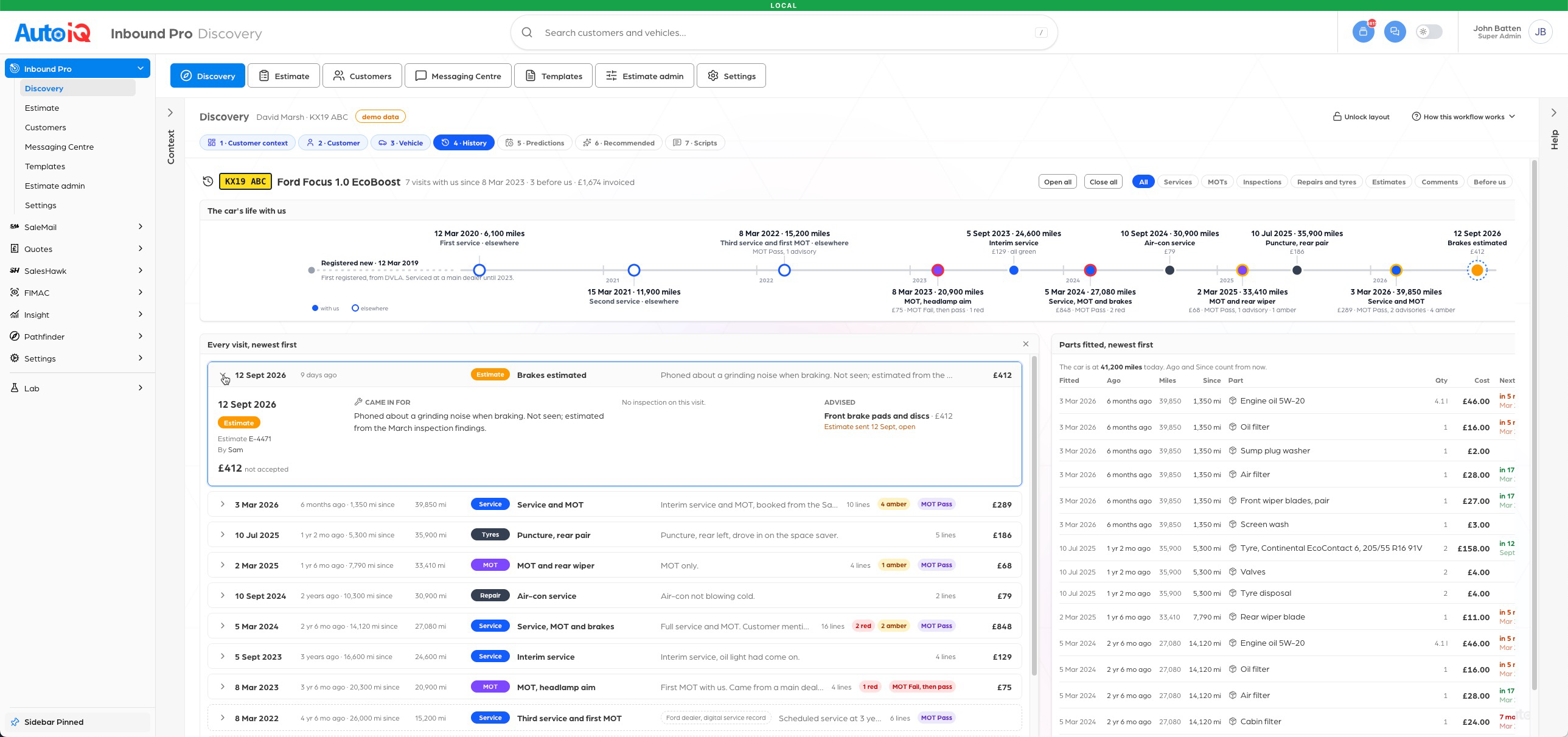
This is a work in progress, but you get the general idea.
The big pictureWhat we've all been building
We've each been heading down our own path, and every one of them is going the right way. What's been harder to see from inside your own patch is where they all meet. So here's the big picture, and where it's converging.
Organisation structure and HR
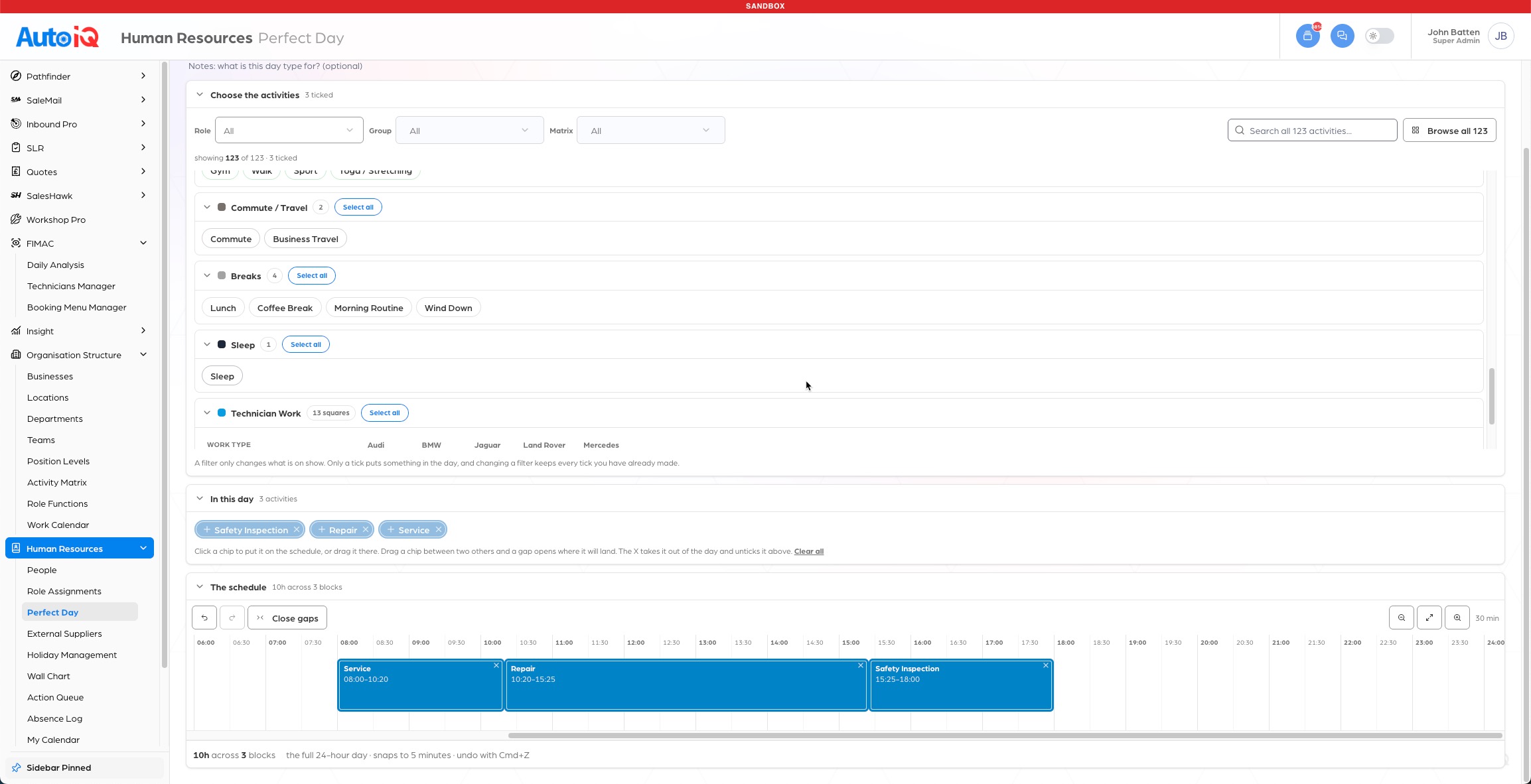
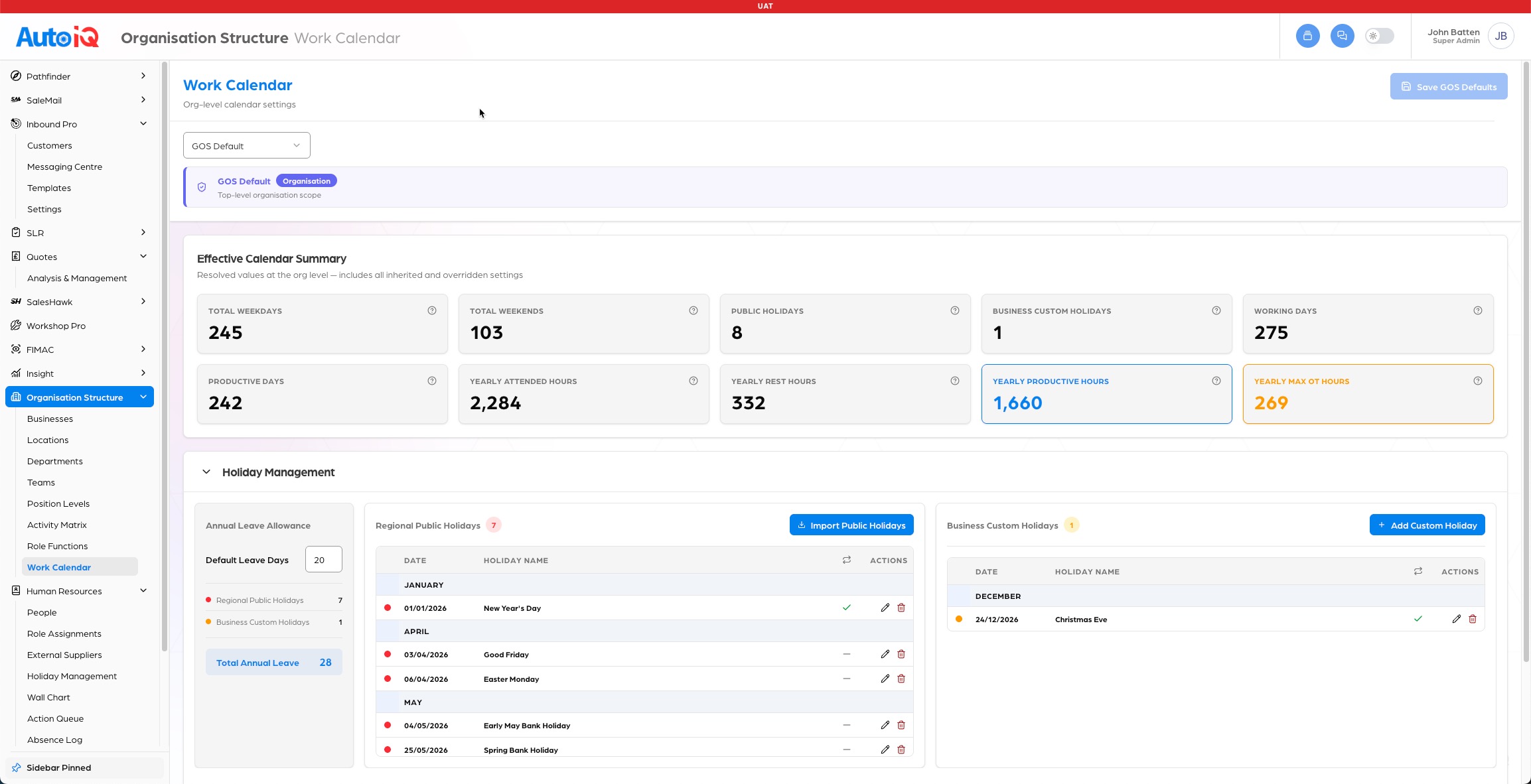
This describes how a garage is put together and how its people are meant to spend their time. It starts with the structure (businesses, locations, departments, teams, position levels and people) and builds up to what good looks like for each role, each day.
The path is six steps: list everything the business does (the Activity Matrix), group activities into roles, define a Perfect Day for a role (which activities, how long, how often), build perfect weeks and months from those days, assign them to real team members, then report daily on how each person's actual day compared with their perfect one.
The direction of travel is assignment and daily reporting, with gross profit per hour on each activity to follow, so a month's profit can be predicted from the plan. It's the foundation, the thing everything else eventually hangs off.


Estimate Builder and SaleMail
Every estimate that comes out of Business Central or MAM looks terrible. Tim's work takes that estimate, uses AI to pull out what matters, and hands it to our email template builder, our own version of Mailchimp, so a garage can put a beautiful, professional email in front of its customer in a couple of clicks, all sent through Message Centre.
It turns the worst looking document a garage sends into the best one. Tim's also rebuilding SaleMail so we can finally get rid of Unlayer. I pulled his quote ingestion work in over the weekend and it's lovely.
WhatsApp compliance and consent
Darren built WhatsApp out and operationally it's working. But with release approaching, Suzie realised there were some compliance i's to dot and t's to cross before we put it in front of customers, so they don't get red marks against them for using WhatsApp incorrectly.
That pulled in a consent change on the frontend, which turned into a proper consent admin centre for every channel. Suzie's working through the requirements now, so what we'll need to build is a small update to the WhatsApp frontend for compliance and a consent admin in the back end to track it. Darren, that one's a natural fit for you once Suzie's ready, and it's a tidy piece of work rather than a big one.
Data and the Business Central APIs
Pulling customer and vehicle data into GOS, tightening up the Business Central ingest with auto-tests and a Slack alert, and now digging into the APIs Business Central has opened up to all its clients.
Paul's already put his finger on it: GOS becomes the single source of truth and we enrich it from Business Central.
Inbound Lead Tracker
In New Duston, building the lead tracker extension, and sketching the screens for where Inbound Pro goes next.
Look at those side by side and something stands out. Four of them, the estimates, WhatsApp, the data behind them and the lead tracker, all land in the same place: communications.
Get those four over the line and a garage has one clean process from the moment an enquiry lands to the moment the car's booked in.
Organisation structure and HR is a different animal. It's bigger, it goes deeper, and it doesn't depend on communications being finished. That's what shapes what I think we do next.
The planSo here's what I think we do
Tie communications up with a bow, and make GOS easy to find your way round while we do it.
The question I'm always answering is which of these things puts value in a client's hands soonest. Right now that's two things: make GOS easy to find your way round, and get communications finished. We're closer on both than it might feel.
Dot the i's and cross the t's on WhatsApp Darren
Once Suzie's finished the requirements, build the frontend changes for compliance and the consent admin behind them, so we can put WhatsApp in front of customers and every channel lives in Message Centre.
Simplify the navigation Darren
I'm working on the sidebar hierarchy now, updating it to fit a team member's workflow rather than just listing products and features. The big change is Pathfinder boards living outside the Pathfinder dropdown, under the workflow they belong to. Darren's worked on this before, so it makes sense for him to take it. Making GOS easy to use is the number one thing for our clients.
Estimate ingestion and SaleMail Tim
Finish estimate ingestion, the SaleMail update and any template builder changes.
Business Central APIs Paul
Carry on through the APIs, so messages fill themselves in with Business Central data and clients hardly have to type.
Inbound Pro MVP John
Turn the lead tracker extension into a proper GOS design, an MVP for you lot to build.
When those land, communications is done. From there it's incremental improvements, not a build.
At a glanceWho's doing what
| Person | Now | Next |
|---|---|---|
| DDarren | WhatsApp frontend compliance changes and consent admin, once Suzie's requirements land | Sidebar navigation: Pathfinder boards outside the Pathfinder dropdown, then org structure and HR with me |
| TTim | Estimate ingestion, SaleMail update and template builder changes | Build the Inbound Lead Tracker once my design lands |
| PPaul | Customer and vehicle data into GOS, then the Business Central APIs | Auto-populating messages with Business Central data; back end for org structure and HR |
| SSuzie | Consent admin centre spec for all communications | Hand the consent spec to Darren as one piece of work |
| JJohn | Sidebar navigation hierarchy; Inbound Pro MVP design; test customer and API board in Pathfinder for Paul | Org structure and HR with Darren; headless GMS front end |
Straight with youDarren, a word from me
Darren, I owe you an apology, and I'd rather say it here than have you read it between the lines of a task list.
The org structure and HR work is an amazing feature. I mean that. It's arguably the foundation of everything our clients do. I think it makes sense to pause it, and here's the thinking behind that.
We're still working through it, and once we're done there's a big piece of work for Paul to build the back end and tie it all together. That puts it a good few months away from a client actually feeling it. Communications we can finish and get in front of them much sooner, and they will deeply value it.
You and I pick it straight back up once points 1 and 2 are across the line, WhatsApp and navigation, along with any other quick miscellaneous items. Hope this is OK with you. If it isn't, say so and we'll talk it through.
Further outAnd after that
Once communications is done, three things.
Org structure and HR
Darren and I pick it back up, with Paul on the back end.
Inbound Lead Tracker
Tim builds it properly into GOS once my design has landed.
A front end on the Business Central APIs
Clients get a far nicer way to use their garage management software, with our data woven in. Headless, as Paul put it.
That third one is the big one. It means we're building our own garage management system, specifically for the specialists we work with.
I've got a feeling we're that close to some real flow. Get the processes right and we can keep layering on top, and nobody else in the industry thinks like this. This is the conversation I've wanted to have for weeks. Thanks, all.
John, Monday 21 September 2026